Malware Analysis for Small Business: Practical Steps and Limits
You can identify basic threats using file hashes and static inspection, but sophisticated attacks require dynamic analysis in isolated environments.
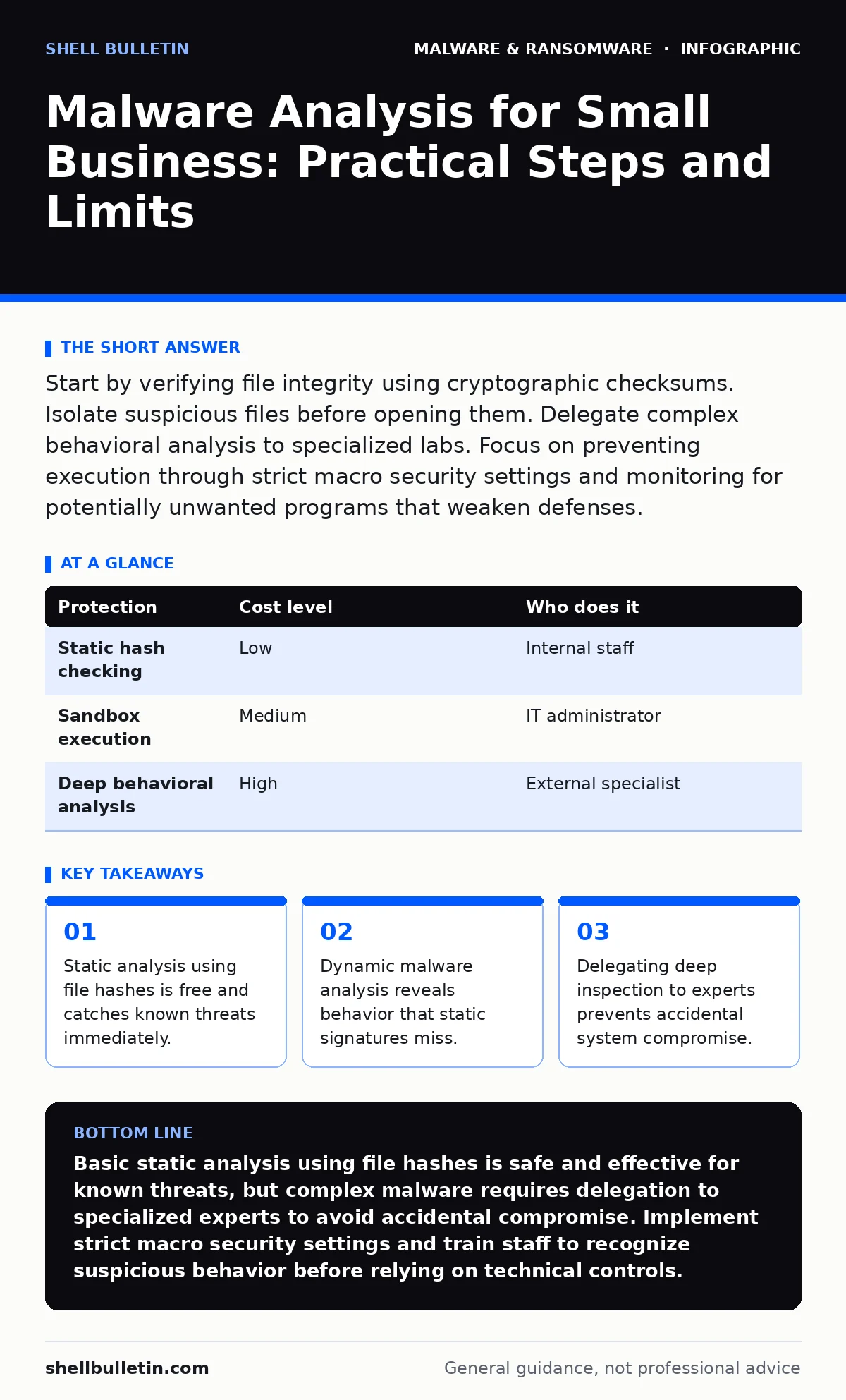
Start by verifying file integrity using cryptographic checksums. Isolate suspicious files before opening them. Delegate complex behavioral analysis to specialized labs. Focus on preventing execution through strict macro security settings and monitoring for potentially unwanted programs that weaken defenses.
The Value of Basic Inspection
You do not need a dedicated security operations center to handle malware. Small organizations benefit most from understanding what malware is and how it enters the system. Malware is malicious software designed to disrupt, damage, or gain unauthorized access to computer systems. By performing basic checks, you can filter out the majority of low-effort attacks.
The primary benefit is speed. Automated tools often flag benign files as threats, causing false positives that waste time. Manual verification allows you to distinguish between a legitimate file and a genuine threat. This reduces downtime and keeps your team focused on productive work rather than investigating every alert.
Static analysis is the first line of defense. This method examines the file without executing it. You look at the file structure, metadata, and code strings. This approach is safe because the file never runs on your network. It is effective against known variants of ransomware and viruses that have been cataloged by security vendors.
Using File Hashes for Detection
File hashes in malware detection provide a unique fingerprint for every file. A hash is a fixed-length string of characters generated by an algorithm from the file's data. If even one bit of the file changes, the hash changes completely. You can generate a hash using built-in operating system tools.
Compare this hash against public threat intelligence feeds. These databases list hashes of known malicious files. If there is a match, you have identified a threat with high confidence. This method requires no special software and costs nothing. It works best when you have the original file and can compare it to a known good version.
This technique fails against polymorphic malware. These variants change their code slightly with each infection, generating a new hash each time. They are designed to evade signature-based detection. You must combine hashing with other methods to catch these evolving threats.
The Risk of Dynamic Analysis
Dynamic malware analysis involves running the suspicious file in a controlled environment. This environment, often a virtual machine, isolates the file from your production network. You observe how the file behaves. Does it try to connect to external servers? Does it modify system files? Does it disable security services?
This method reveals the true intent of the malware. It catches fileless malware, which operates in memory and leaves few traces on the disk. It also identifies screen locker ransomware that encrypts files or locks the user interface. Seeing the behavior allows you to create specific rules to block similar threats in the future.
However, dynamic analysis carries significant risk. If the isolation is imperfect, the malware can escape the sandbox. It can spread to your host machine or network. This is why you should not perform dynamic analysis on your primary workstations. The cost of a mistake here is a full system compromise.
| Protection | Cost level | Who does it |
|---|---|---|
| Static hash checking | Low | Internal staff |
| Sandbox execution | Medium | IT administrator |
| Deep behavioral analysis | High | External specialist |
Handling Advanced Threats
Some malware is designed specifically to evade detection. DLL sideloading is a technique where a malicious dynamic link library is loaded by a legitimate program. The malware hides in plain sight, borrowing the trust of the legitimate application. This is difficult to detect with standard antivirus software.
Another challenge is potentially unwanted programs. These are not strictly malware, but they often include adware or tracking components that weaken system security. They may disable updates or install unwanted toolbars. While not immediately destructive, they create vulnerabilities that attackers exploit later.
You should also be aware of macro security settings. Many documents contain macros, which are small scripts that automate tasks. Attackers often embed malicious code in these macros. If users enable macros without warning, the malware executes immediately. Configuring your software to block all macros by default is a critical control.
What to Delegate
You cannot do everything in-house. Small businesses often lack the expertise to analyze complex threats. Attempting to dissect advanced malware can lead to accidental activation. This can trigger encryption or data exfiltration before you realize the danger.
Delegate dynamic analysis and reverse engineering to specialized firms. These organizations have isolated labs and experienced analysts. They can determine the scope of an infection and provide remediation steps. This service is usually available on a per-incident basis, making it affordable for occasional use.
When hiring an IT provider, ask specific questions about their analysis capabilities. Do not accept vague promises of "total protection." You need to know how they handle unknown threats.
- How do you isolate suspicious files before analysis?
- Do you use automated sandboxes or manual inspection?
- What is your process for updating detection rules after a new threat is found?
- How do you communicate findings to non-technical staff?
- What is the turnaround time for critical incidents?
See also: How Malware Payloads Operate: A Step-by-Step Breakdown · Malware Defense: Practical Steps for Small Business Security
Building a Sustainable Process
Malware analysis is not a one-time task. It is part of an ongoing security strategy. You must balance the cost of analysis with the risk of infection. Over-analyzing every file can slow down operations. Under-analyzing can lead to breaches.
Start with the basics. Train your staff to recognize suspicious emails and attachments. Implement strict macro security settings to prevent accidental execution. Use file hashes to verify the integrity of downloaded software. These steps catch the majority of threats.
For anything that bypasses these controls, escalate to dynamic analysis or external experts. Do not attempt to analyze complex threats on your production systems. The risk of collateral damage is too high. Focus on prevention and rapid response rather than deep forensic investigation.
Integrating with Daily Operations
Make analysis part of your routine. When a new threat emerges, update your detection rules immediately. Review logs regularly to identify patterns. Look for unusual network connections or file modifications.
Document every incident. Record what happened, how you detected it, and how you responded. This knowledge base helps you react faster to future threats. It also helps you train your staff on what to look for.
Remember that no single tool or method provides complete protection. You must layer your defenses. Combine static checks, behavioral monitoring, and user training. This multi-layered approach ensures that if one defense fails, another will catch the threat.
Key takeaways
- Static analysis using file hashes is free and catches known threats immediately.
- Dynamic malware analysis reveals behavior that static signatures miss.
- Delegating deep inspection to experts prevents accidental system compromise.
Basic static analysis using file hashes is safe and effective for known threats, but complex malware requires delegation to specialized experts to avoid accidental compromise. Implement strict macro security settings and train staff to recognize suspicious behavior before relying on technical controls.
Frequently asked questions
Can I use online sandboxes for malware analysis?
Yes, public sandboxes allow you to upload files for automated analysis. However, do not upload sensitive or proprietary data, as the file may be stored or shared by the service provider.
How often should I update my detection rules?
Update rules immediately after any confirmed incident. Regular updates should occur at least weekly to keep pace with new threats and changes in your environment.
What is the difference between a virus and ransomware?
A virus replicates itself and spreads to other files, while ransomware encrypts your data and demands payment for the decryption key. Both are types of malware but have different goals and behaviors.
Should I disable all macros in my documents?
Yes, disabling all macros by default is a best practice. Only enable macros for trusted sources when absolutely necessary. This prevents most document-based malware from executing.
How this guide was produced: written by the Shell Bulletin editorial team with AI assistance, checked against the public references listed below, and reviewed when the facts change. See our editorial policy or report an error.