DNS Hijacking Response: Recovery Steps and Containment Plan
Redirecting traffic at the domain level bypasses most perimeter defenses, making immediate registrar lock the only effective containment measure.

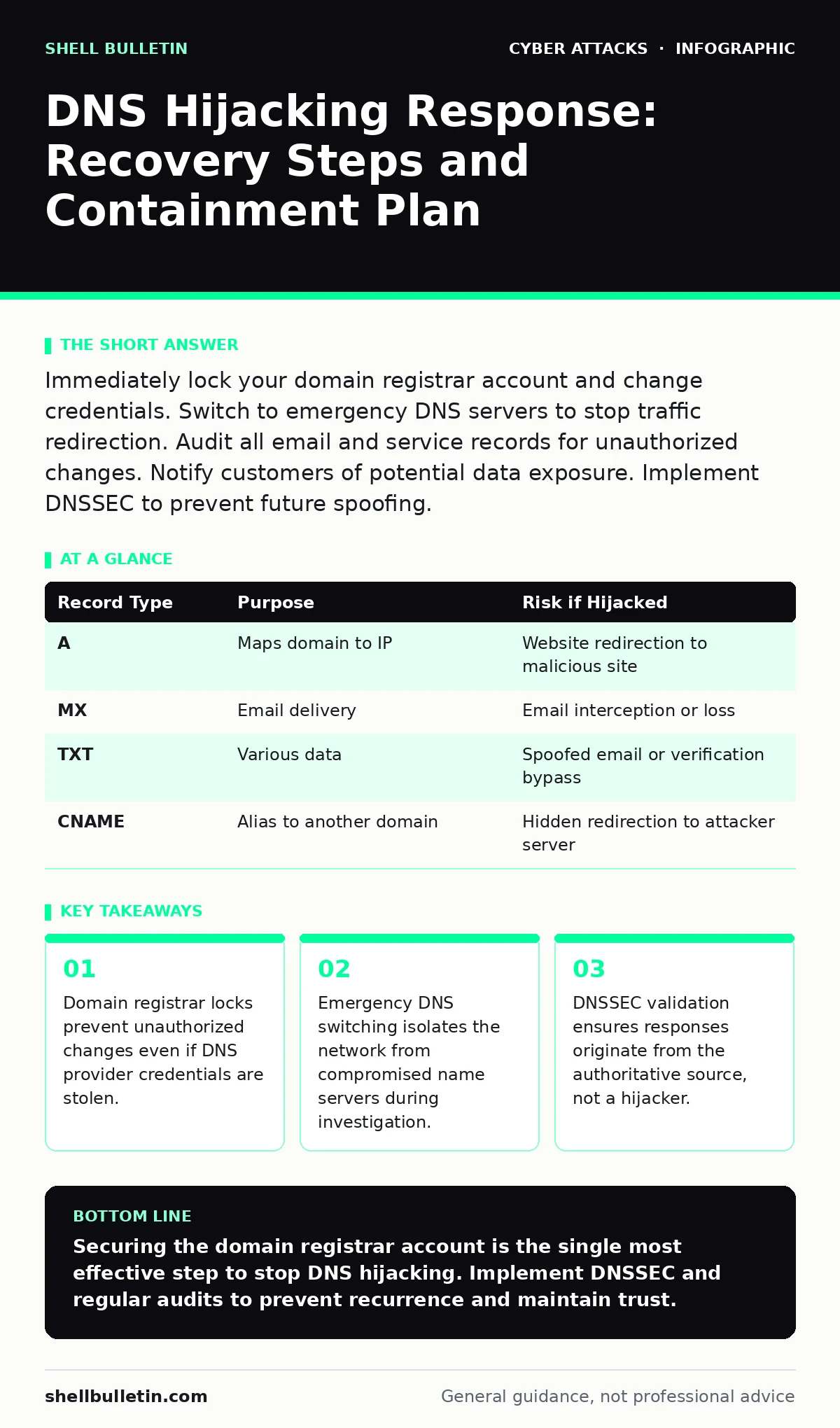
Immediately lock your domain registrar account and change credentials. Switch to emergency DNS servers to stop traffic redirection. Audit all email and service records for unauthorized changes. Notify customers of potential data exposure. Implement DNSSEC to prevent future spoofing.
First hour
You suspect DNS hijacking when legitimate websites load incorrectly or email delivery fails unexpectedly. The attacker has altered the records that tell browsers where to find your services. This is not a local computer issue; it is a structural compromise of your online identity.
Your first priority is to stop the attacker from making further changes. You must secure the account at the domain registrar, not just the DNS hosting provider. The registrar is the entity that records your ownership of the domain name. If the attacker has access to the registrar account, they can transfer the domain away entirely.
- Contact your domain registrar immediately via phone or secure support channel.
- Request an urgent account lock or transfer lock on all affected domains.
- Change the registrar account password and enable multi-factor authentication.
- Verify that no unauthorized users have been added to the account.
Do not assume the breach is limited to one domain. Attackers often compromise multiple domains under the same ownership. Check every domain registered to your organization. If you use a third-party IT provider, verify their access credentials have not been compromised. This step isolates the control plane from the data plane.
First day
Once the registrar account is locked, you must restore correct traffic routing. The attacker may have changed the nameservers or specific records like A records or CNAME records. An A record maps a domain name to an IP address. A CNAME record maps a domain to another domain name.
Switch your domain’s nameservers to a trusted, emergency DNS provider. This moves the resolution authority away from the compromised infrastructure. You can use a free or paid emergency DNS service that allows immediate record creation. This action stops the hijacking but does not fix the underlying security hole.
You must now audit the DNS zone file. This is the database of all records for your domain. Look for records you do not recognize. Attackers often add subtle records that redirect specific paths, such as login pages, to malicious sites while leaving the main homepage intact. This technique is known as subdomain hijacking.
Check for changes to email records. MX records tell the internet where to deliver email for your domain. SPF records define which servers are allowed to send email on your behalf. DMARC records specify how to handle unauthorized email. If these are altered, attackers can intercept your email or send spam using your name.
| Record Type | Purpose | Risk if Hijacked |
|---|---|---|
| A | Maps domain to IP | Website redirection to malicious site |
| MX | Email delivery | Email interception or loss |
| TXT | Various data | Spoofed email or verification bypass |
| CNAME | Alias to another domain | Hidden redirection to attacker server |
Refer to our guide on email authentication to understand how SPF and DMARC protect your reputation. If these records were altered, you must restore them immediately to prevent your domain from being blacklisted.
First week
After stabilizing the infrastructure, you must assess the damage. You need to determine what data was exposed and who was affected. This requires analyzing logs from the DNS provider, web servers, and email systems.
You must notify affected parties. This includes customers, employees, and partners. Be transparent about what happened and what you are doing to fix it. Silence erodes trust faster than the incident itself. If you suspect credential theft, force password resets for all user accounts.
Investigate how the attack happened. DNS hijacking usually occurs through account takeover of the registrar or DNS provider. This often involves phishing or weak credentials. Check your internal systems for malware that may have stolen login cookies.
Consider implementing DNSSEC. DNS Security Extensions is a protocol that adds cryptographic signatures to DNS records. It allows resolvers to verify that the DNS response came from the authoritative source and was not altered in transit. This prevents many forms of cache poisoning and hijacking.
Refer to our guide on account takeover to learn how to secure the credentials that likely led to this breach. Weak passwords and lack of multi-factor authentication are common entry points.
Who to tell
You must inform several groups. Internal stakeholders need to know the scope. Customers need to know if their data was at risk. Regulators may need to be notified depending on your industry and location.
If you use cloud services or third-party vendors, inform them. They may need to adjust their security settings or investigate their own logs. If you are part of a larger organization or consortium, follow their incident reporting procedures.
Document everything. Keep a timeline of events, actions taken, and communications sent. This documentation is vital for post-incident review and potential legal proceedings.
How to stop a repeat
Prevention requires hardening the entire DNS supply chain. Start with the registrar. Enable all available security features, including transfer locks, registry locks, and multi-factor authentication. Use a dedicated, strong password for the registrar account, different from all other accounts.
Implement DNSSEC on all your domains. This adds a layer of cryptographic verification that makes it much harder for attackers to redirect traffic. While it adds complexity to management, it significantly reduces the risk of successful hijacking.
Monitor your DNS records for unauthorized changes. Many DNS providers offer alerting services that notify you when records are modified. Set up alerts for any changes to critical records like A, MX, and TXT records.
Regularly audit your DNS configurations. Remove unused records and subdomains. Each record is a potential attack surface. The principle of least privilege applies to DNS as well. Only expose what is necessary.
Refer to our guide on cyber hygiene for broader practices that reduce your overall attack surface. Good hygiene includes regular software updates, strong password policies, and employee training.
See also: Cloud Incident Response: 8 Critical Questions Answered · What Is Incident Response: The Plan That Stops Digital Chaos
Final checks
Before declaring the incident resolved, perform a final validation. Use external DNS lookup tools to verify that your records are correct and consistent across multiple global locations. Ensure that DNSSEC signatures are valid.
Test email delivery and website access from different networks. Confirm that no residual redirects are in place. Review firewall and intrusion detection logs for any remaining suspicious activity.
Update your incident response plan based on what you learned. Identify gaps in detection and response. Train your team on the new procedures. Security is an ongoing process, not a one-time fix.
Refer to our guide on network segmentation to ensure that a future compromise cannot spread laterally through your infrastructure. Isolating critical systems limits the blast radius of any breach.
Key takeaways
- Domain registrar locks prevent unauthorized changes even if DNS provider credentials are stolen.
- Emergency DNS switching isolates the network from compromised name servers during investigation.
- DNSSEC validation ensures responses originate from the authoritative source, not a hijacker.
Securing the domain registrar account is the single most effective step to stop DNS hijacking. Implement DNSSEC and regular audits to prevent recurrence and maintain trust.
Frequently asked questions
Can I recover data lost during DNS hijacking?
Data recovery depends on whether backups were encrypted and stored securely. If the attacker accessed your systems, they may have exfiltrated data before you detected the hijack. Assume all data exposed during the hijacking window is compromised.
Is DNSSEC difficult to implement?
DNSSEC adds complexity to DNS management because you must manage cryptographic keys. However, many DNS providers offer managed DNSSEC services that simplify the process. The benefit of preventing hijacking and spoofing outweighs the initial setup effort.
How this guide was produced: written by the Shell Bulletin editorial team with AI assistance, checked against the public references listed below, and reviewed when the facts change. See our editorial policy or report an error.