Detect Clone Phishing: Log Signals, Tool Gaps and Blind Spots
Clone phishing attacks bypass standard filters by reusing trusted sender addresses, forcing detection to rely on temporal anomalies and metadata inconsistencies rather than content analysis.
Detect clone phishing by analyzing message headers for duplicate message IDs and checking delivery timestamps against the original communication. Review user behavior for duplicate approvals and inspect mail logs for rapid-fire requests from known senders.
The Mechanics of the Clone
Clone phishing differs from standard spear phishing in its source. The attacker does not spoof a random executive. Instead, they intercept an existing, legitimate email thread and resend it with a malicious attachment or link. The sender address remains the same. The subject line remains the same. To a casual observer, it is identical to the original message.
This tactic exploits trust. You have already received a message from this person. You know the context. Your guard is down because the communication pattern matches your expectations. The attacker relies on this familiarity to bypass your initial skepticism.
The goal is usually credential theft or malware delivery. By cloning a message you have already seen, the attacker reduces the cognitive load required to make you click. You are not deciding whether to trust a stranger. You are deciding whether to act on a familiar request.
Header Discrepancies and Metadata
The most reliable indicator of a clone is in the email headers. Most people never look here, but it contains the forensic truth. Check the Message-ID field. This unique identifier is generated by the sending mail server. If you have received two emails with the same subject and sender, compare their Message-IDs.
Legitimate follow-ups will have different Message-IDs. Clones often reuse the original Message-ID to appear as the same message. Even if the ID changes, look at the Received headers. These trace the path of the email through various servers. A clone sent from a different location will show a different initial hop, even if the sender address is identical.
Another clue is the Date header versus the actual delivery time. Attackers sometimes backdate cloned emails to make them look like they were sent earlier. Compare the header date with the timestamp in your mail logs. A mismatch suggests manipulation.
Temporal Anomalies in Logs
Time is the attacker’s enemy. They need you to act before you realize something is wrong. This creates a pattern in your logs. Look for rapid succession. Suppose a user receives an invoice at 9:00 AM. If a second email with the same subject arrives at 9:02 AM from the same sender, that is a red flag.
Your mail gateway logs can highlight this. Configure alerts for duplicate subjects from the same sender within a short window. This is not always malicious, but it is highly suspicious in a business context. Legitimate senders rarely resend identical messages minutes apart unless they made an error.
Imagine a scenario where a vendor sends a contract. The attacker clones it and adds a malicious PDF. The user opens the original, sees the request, and then opens the clone five minutes later. The speed of the second request bypasses the user’s natural pause for verification.
Behavioral Signals in User Actions
Logs show what happened to the email. User behavior shows what happened to the user. Look for duplicate approvals. If a finance system logs two approval requests for the same invoice number within an hour, investigate. The clone phishing attack often targets payment portals or identity providers.
Check for unusual login times. If a user clicks a link in a clone, they may be directed to a login page. If that login attempt comes from a new device or location, it is a signal. However, not all clones lead to immediate logins. Some deliver malware that sits dormant.
Monitor for repeated access to the same resource. If a user downloads a file, then attempts to download it again from a slightly different URL, the second attempt may be the clone. The URL may look similar but host a different file.
Tool Limitations and Enhancements
Standard spam filters struggle with clones. Why? Because the content is legitimate. The sender is real. The message body is often copied exactly. Email authentication protocols like SPF and DKIM will likely pass because the email originates from the legitimate domain’s servers. The attacker is not spoofing the domain; they are using it.
You need tools that look beyond content. Implement a message archival solution that indexes every email by Message-ID and hash. This allows you to query for duplicates. If a new email has the same hash as a previous one, flag it for review.
Enhance your endpoint detection. Look for the execution of documents that were recently opened. If a user opens a PDF, then opens another PDF with the same name but a different hash, that is a potential clone. Your cyber hygiene practices should include training users to verify unexpected duplicates, even if they appear to come from trusted sources.
See also: 7 Email Filtering Mistakes That Let Threats Through Your Inbox · What Are Computer Viruses: Definition, Spread, and Defense
Common Blind Spots in Detection
One major blind spot is the assumption that authentication equals safety. As mentioned, SPF and DKIM verify the domain, not the intent. A clone passes these checks because it is sent from the legitimate domain. Do not rely on these protocols to stop clones. They prevent spoofing, not cloning.
Another blind spot is internal communication. Clones often originate from within the organization. An attacker compromises a low-privilege account and clones an email from a senior executive. The sender is internal. The recipient trusts internal messages more. Your detection rules must apply equally to internal and external senders.
Consider the role of OAuth consent phishing. Attackers may clone a message requesting permission for an app. The clone looks like a standard consent request. If you do not monitor for duplicate consent requests, you may miss the attack. The user grants access, and the attacker gains entry.
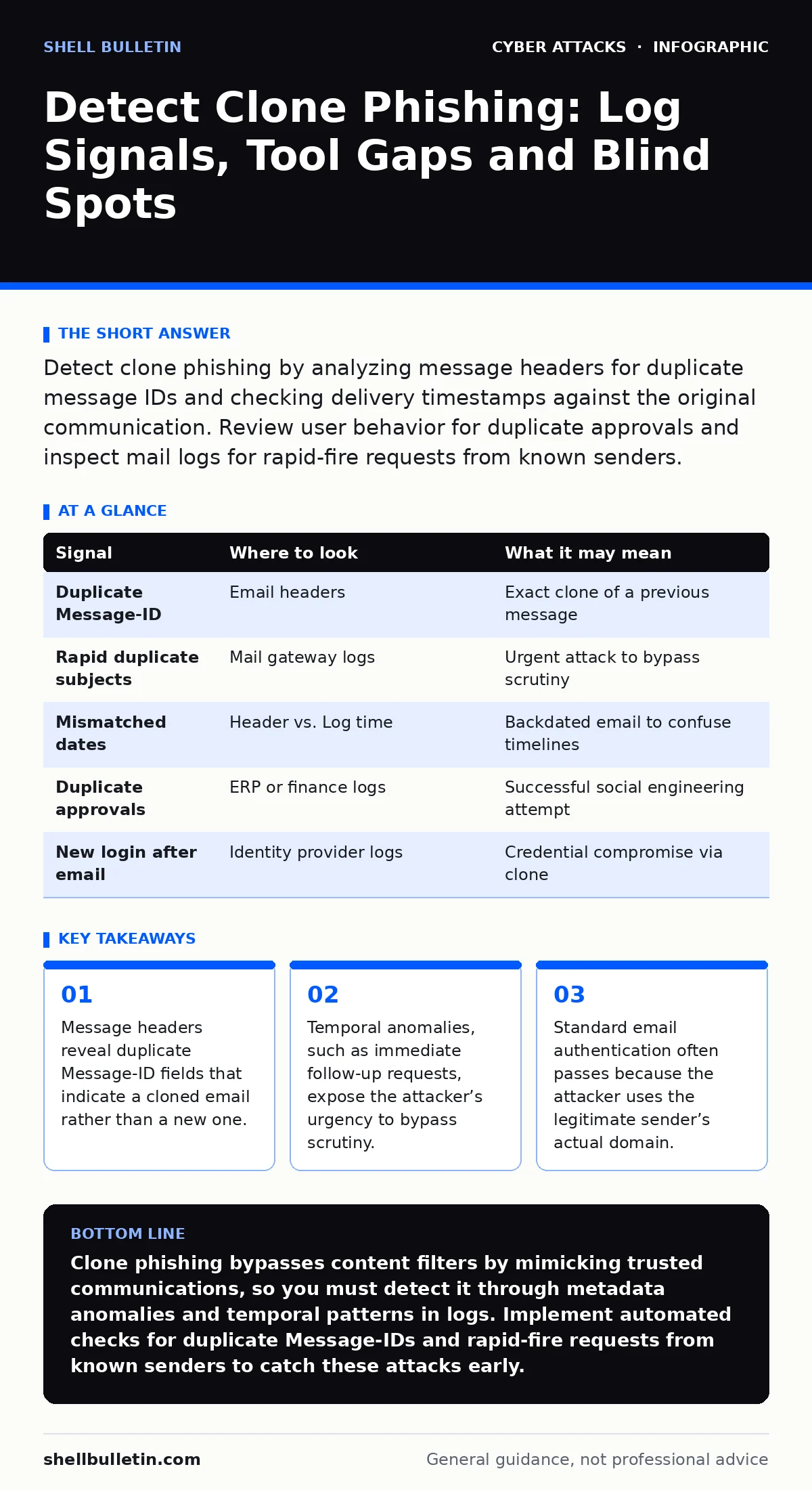
| Signal | Where to look | What it may mean |
|---|---|---|
| Duplicate Message-ID | Email headers | Exact clone of a previous message |
| Rapid duplicate subjects | Mail gateway logs | Urgent attack to bypass scrutiny |
| Mismatched dates | Header vs. Log time | Backdated email to confuse timelines |
| Duplicate approvals | ERP or finance logs | Successful social engineering attempt |
| New login after email | Identity provider logs | Credential compromise via clone |
Integrating Detection Efforts
Detection is not a single tool. It is a combination of log analysis, header inspection, and behavioral monitoring. You must correlate data from different sources. The mail log tells you the email arrived. The endpoint log tells you the file opened. The identity log tells you who logged in.
Start by baselining normal behavior. How often do your users receive duplicate emails? How quickly do they usually respond? Deviations from this baseline are your signals. Use this data to tune your alerts. Reduce noise by focusing on high-risk actions, such as payments or data exports.
Remember that account takeover is often the end goal of clone phishing. The clone is the delivery mechanism. The stolen credentials are the payload. Your detection must span from the inbox to the application layer. If you only watch the inbox, you will miss the compromise.
Refining Your Approach
Regularly review your detection rules. Attackers adapt. They may vary the timing or change the metadata slightly. Your rules must be flexible. Use machine learning models if available, but validate their findings manually. False positives can lead to alert fatigue, causing you to miss real threats.
Train your users to recognize the pattern of urgency. Clones often create a false sense of urgency. "I sent this earlier, but you didn’t get it." "Please approve immediately." These phrases are common. Teach users to verify via a different channel if they receive a duplicate request.
Integrate these practices with your broader security strategy. Network segmentation limits the damage if a clone delivers malware. DNS hijacking protections prevent domain theft that could facilitate cloning. Each layer adds resilience.
Key takeaways
- Message headers reveal duplicate Message-ID fields that indicate a cloned email rather than a new one.
- Temporal anomalies, such as immediate follow-up requests, expose the attacker’s urgency to bypass scrutiny.
- Standard email authentication often passes because the attacker uses the legitimate sender’s actual domain.
Clone phishing bypasses content filters by mimicking trusted communications, so you must detect it through metadata anomalies and temporal patterns in logs. Implement automated checks for duplicate Message-IDs and rapid-fire requests from known senders to catch these attacks early.
Frequently asked questions
How do I differentiate a clone from a legitimate resend?
Compare the Message-ID in the headers. Legitimate resends have unique IDs, while clones often reuse the original ID or show inconsistent routing paths.
Can email authentication stop clone phishing?
No, because clones use the legitimate sender’s domain and servers, so SPF and DKIM checks will pass. You must look at metadata and behavior instead.
What is the first step in detecting a clone?
Check your mail logs for duplicate subject lines and senders arriving within a short time window, then inspect the headers for matching Message-IDs.
Do internal emails pose a risk for clone phishing?
Yes, if an internal account is compromised, attackers can clone messages from trusted colleagues, bypassing external perimeter defenses.
How this guide was produced: written by the Shell Bulletin editorial team with AI assistance, checked against the public references listed below, and reviewed when the facts change. See our editorial policy or report an error.