How Does Email Encryption Work: The Mechanism Behind Secure Messaging
Email encryption splits your message into separate pieces, sending the data through public channels while keeping the decryption key in a private vault that only the recipient controls.

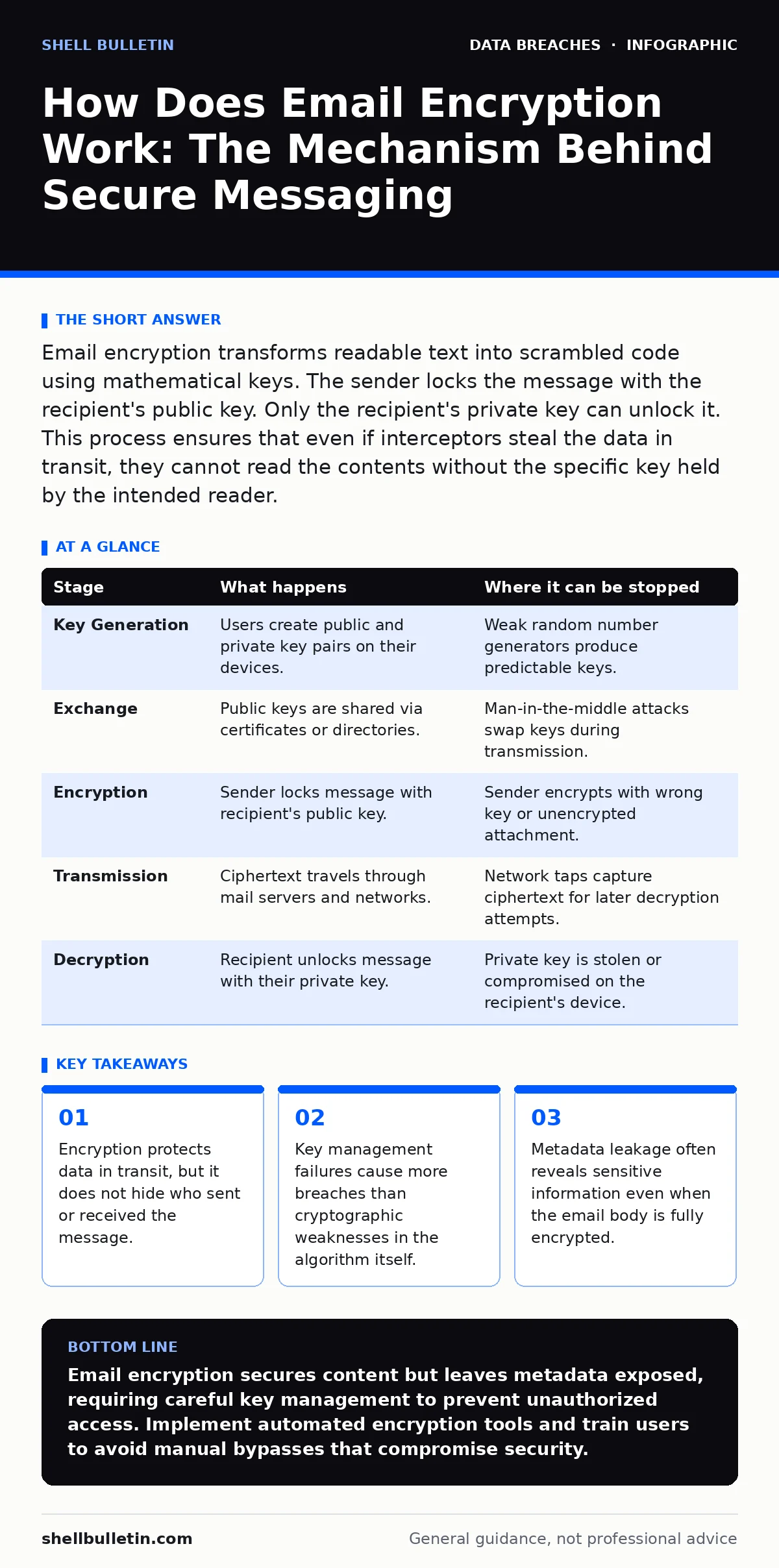
Email encryption transforms readable text into scrambled code using mathematical keys. The sender locks the message with the recipient's public key. Only the recipient's private key can unlock it. This process ensures that even if interceptors steal the data in transit, they cannot read the contents without the specific key held by the intended reader.
How Does Email Encryption Work in Practice
Email encryption works by converting plain text into ciphertext using a pair of mathematical keys. You write a message in standard format. The software then applies an algorithm to scramble that text. The result is unreadable garbage to anyone without the correct key. This process happens before the message leaves your outbox. It ensures that the content remains secret during transport across the internet.
The system relies on asymmetric cryptography. This method uses two distinct keys that are mathematically linked. One key is public and shared openly. The other key is private and kept secret. You use the public key to lock the message. Only the corresponding private key can unlock it. This eliminates the need to share secret passwords over insecure channels.
Stage 1: Key Generation and Exchange
The process begins with key generation. Both the sender and the recipient generate a unique pair of keys. Each party keeps their private key on their device. They share their public key with the other party. This exchange often happens automatically through digital certificates. These certificates verify the identity of the key owner. Without this verification, you might send encrypted data to an attacker who impersonates the recipient.
The private key must never leave the device where it was created. If you export it to a USB drive or email it, the security model breaks. The public key, however, is designed to be distributed widely. It can be published on websites or exchanged via directory services. This separation allows secure communication without prior secret sharing.
| Stage | What happens | Where it can be stopped |
|---|---|---|
| Key Generation | Users create public and private key pairs on their devices. | Weak random number generators produce predictable keys. |
| Exchange | Public keys are shared via certificates or directories. | Man-in-the-middle attacks swap keys during transmission. |
| Encryption | Sender locks message with recipient's public key. | Sender encrypts with wrong key or unencrypted attachment. |
| Transmission | Ciphertext travels through mail servers and networks. | Network taps capture ciphertext for later decryption attempts. |
| Decryption | Recipient unlocks message with their private key. | Private key is stolen or compromised on the recipient's device. |
Stage 2: Message Preparation and Encryption
You compose your email as usual. The encryption software intercepts the message before it sends. It retrieves the recipient's public key from your address book or certificate store. The software then applies the encryption algorithm to the body and attachments. This transforms the content into ciphertext. The original text is discarded or overwritten in memory.
This stage often fails due to user error. You might forget to attach a file. The attachment remains unencrypted while the body is locked. Or you might send the message to a group where one member lacks a public key. The system may fail to encrypt the entire batch. You must verify that every recipient has a valid key. Some systems fall back to unencrypted delivery if a key is missing.
Stage 3: Transmission Through the Network
The encrypted message enters the mail transfer system. It travels through multiple servers before reaching the recipient. Each server sees only the ciphertext and the header information. The header contains routing data like sender address and timestamp. It does not contain the message content. This separation protects the payload from casual inspection.
However, the headers remain visible. Network operators can see who communicates with whom. They can analyze traffic patterns. This metadata can reveal sensitive relationships or business activities. Encryption does not anonymize communication. It only hides the content. If an attacker knows you are discussing a merger, the timing and frequency of encrypted emails can confirm it.
Stage 4: Reception and Decryption
The recipient's mail server receives the ciphertext. It forwards it to the recipient's client application. The client checks for the recipient's private key. If the key is present and unlocked, the software decrypts the message. The ciphertext transforms back into readable text. The recipient sees the original email.
This step requires the private key to be accessible. If the key is password-protected, the recipient must enter the password. If the key is stored on a hardware token, the recipient must insert the token. Any failure here blocks access. The message remains encrypted until the key is provided. This ensures that even if the server is compromised, the data stays protected.
Hidden Costs and Common Failures
Encryption introduces friction. Users must manage keys and passwords. This complexity leads to workarounds. Employees might bypass encryption for convenience. They might send sensitive data via unencrypted channels like instant messaging. These bypasses create blind spots in your security posture.
Key rotation is often neglected. Keys should be replaced periodically. Old keys may be compromised. If you keep using the same key for years, a single breach exposes all past communications. Implementing a strict key management policy is difficult. It requires coordination across all users. Many organizations lack the resources to manage this effectively.
Integration with Compliance Frameworks
Regulatory frameworks often mandate encryption for sensitive data. The HIPAA Security Rule requires protection of electronic protected health information. Encryption is a safe harbor measure. If encrypted data is lost, it may not trigger breach notification laws. This reduces legal and financial liability.
Similarly, PCI DSS standards require encryption for cardholder data in transit. Email containing credit card numbers must be encrypted. Failure to do so violates compliance requirements. Auditors will check for encryption controls. You must demonstrate that keys are managed securely. Documentation of these processes is critical for compliance.
Managing Metadata and Side Channels
Even with strong encryption, side channels exist. The size of the encrypted message reveals clues about the content. A large attachment suggests a document. A small message suggests a note. Attackers can use this information to infer context.
Timing analysis is another risk. Sending an email immediately after a phone call correlates the two events. This correlation reveals the subject matter. To mitigate this, some systems add padding. Padding increases the message size to a standard block. This hides the original size. However, it increases bandwidth usage and storage costs.
See also: 7 Email Filtering Mistakes That Let Threats Through Your Inbox · What Are Computer Viruses: Definition, Spread, and Defense
Best Practices for Implementation
Start with a clear policy. Define what data requires encryption. Not all emails need protection. Over-encryption creates noise and reduces security. Focus on high-value data. Integrate encryption into your existing workflow. Use tools that automate the process. Manual steps lead to errors.
Train your users. They must understand the limits of encryption. They must know how to handle keys. They must recognize phishing attempts that target key management. Regular training reinforces these behaviors. Monitor for failures. Log encryption errors. Review these logs regularly. This helps identify systemic issues before they lead to breaches.
Key takeaways
- Encryption protects data in transit, but it does not hide who sent or received the message.
- Key management failures cause more breaches than cryptographic weaknesses in the algorithm itself.
- Metadata leakage often reveals sensitive information even when the email body is fully encrypted.
Email encryption secures content but leaves metadata exposed, requiring careful key management to prevent unauthorized access. Implement automated encryption tools and train users to avoid manual bypasses that compromise security.
Frequently asked questions
Does email encryption hide who I am sending to?
No, encryption only protects the message body and attachments. The header information, including sender and recipient addresses, remains visible to network providers and intermediaries.
What happens if I lose my private key?
You will not be able to decrypt any messages sent to you with that key. The data is permanently inaccessible. Always back up your private key securely, but never store it in an easily accessible location.
Is end-to-end encryption different from standard email encryption?
Yes, end-to-end encryption keeps the key on the user's device, preventing the email service provider from reading the content. Standard encryption may allow the provider to decrypt messages for scanning or storage.
Do I need encryption for all my emails?
No, encrypt every email creates unnecessary friction. Focus on messages containing sensitive personal, financial, or health data. Use standard security for routine communications to maintain productivity.
How this guide was produced: written by the Shell Bulletin editorial team with AI assistance, checked against the public references listed below, and reviewed when the facts change. See our editorial policy or report an error.