7 Email Filtering Mistakes That Let Threats Through Your Inbox
Most breaches bypass filters not because the technology failed, but because administrators configured rules that prioritize delivery over strict security validation.
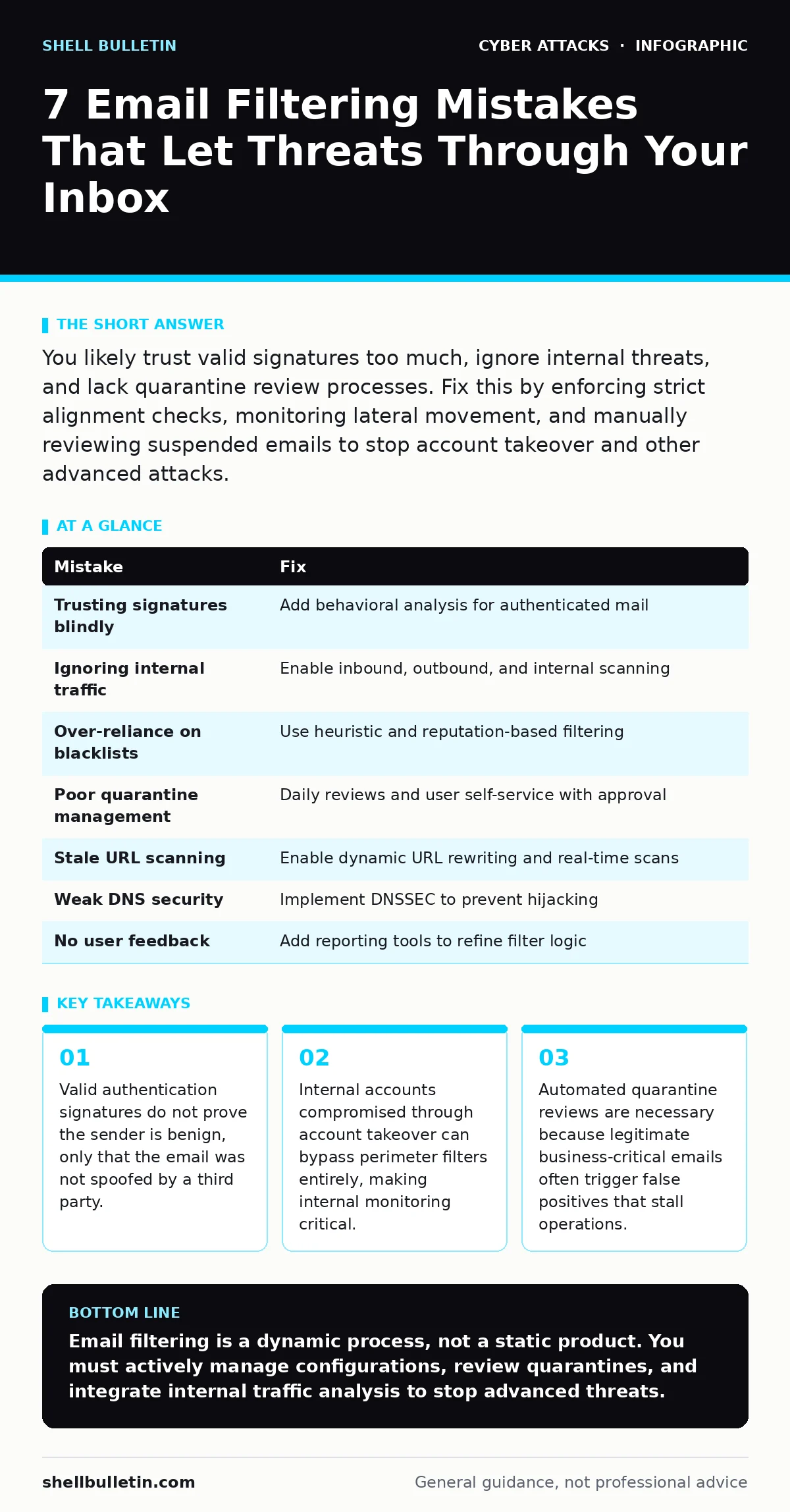
You likely trust valid signatures too much, ignore internal threats, and lack quarantine review processes. Fix this by enforcing strict alignment checks, monitoring lateral movement, and manually reviewing suspended emails to stop account takeover and other advanced attacks.
Email filtering is often treated as a set-and-forget utility. You install the service, point your DNS records at it, and assume it handles the rest. This passive approach creates blind spots. Attackers adapt quickly to static rules. If your configuration relies on default settings or outdated logic, you leave the door open for sophisticated intrusions that look legitimate to automated systems.
Mistake 1: Trusting Authentication Signatures Blindly
Why it hurts:
Many administrators assume that if an email passes email authentication checks, it is safe. This is a fundamental misunderstanding of what these protocols do. Authentication proves that the email originated from the domain it claims to be from. It does not prove that the domain owner sent it willingly. If an attacker compromises a legitimate account, their malicious emails will pass all authentication checks with a perfect score. This allows them to blend in with normal traffic, bypassing filters that rely solely on signature validation.
The fix:
Implement behavioral analysis alongside authentication. Look for anomalies in sending patterns, such as a finance executive sending attachments to external vendors at unusual hours. Treat authenticated emails from compromised accounts with the same suspicion as spoofed ones. This layer of defense is necessary to catch threats that have already breached the perimeter.
Mistake 2: Ignoring Internal-to-External Traffic
Why it hurts:
Most filtering solutions focus heavily on inbound traffic. They scan emails coming from the internet into your organization. However, once an attacker achieves account takeover, they use that access to send malicious content outward or to other internal users. If your filters do not inspect internal-to-internal or internal-to-external traffic, you miss the lateral movement phase of an attack. The attacker can now distribute malware or phishing links to other employees who trust the internal source.
The fix:
Enable outbound and internal traffic scanning. Ensure your filtering solution inspects emails between employees just as rigorously as it inspects incoming mail. This prevents a compromised account from becoming a distribution point for further attacks. It also helps identify when data is being exfiltrated out of the organization.
Mistake 3: Over-Reliance on Blacklists
Why it hurts:
Blacklists are reactive. They block known bad actors after they have already caused damage. Relying primarily on blacklists leaves you vulnerable to new, unseen threats. Attackers constantly rotate IP addresses and use compromised legitimate servers to send mail. These sources will not appear on blacklists until long after their malicious campaigns have run. By the time they are listed, your organization may have already suffered a breach.
The fix:
Shift your focus to heuristic and reputation-based filtering. These systems analyze the content and behavior of emails in real-time. They look for suspicious links, unusual formatting, and social engineering cues. This proactive approach catches threats that have not yet been identified by the broader security community.
Mistake 4: Poor Quarantine Management
Why it hurts:
Aggressive filtering generates false positives. Legitimate emails from partners or clients may be blocked and sent to quarantine. If you do not have a process to review this quarantine regularly, business operations suffer. More dangerously, attackers may use this noise to hide malicious emails. They send a high volume of spam to trigger false positives, burying their actual phishing attempt in the clutter.
The fix:
Establish a routine for reviewing the quarantine. Designate a specific team or individual to check for false positives daily. Implement a self-service portal for users to request the release of blocked emails, but require manual approval for sensitive requests. This balances security with usability and prevents attackers from leveraging volume to obscure their tactics.
Mistake 5: Failing to Update URL Rewriting Rules
Why it hurts:
Modern phishing attacks use fast-flux domains. These domains change their IP addresses rapidly to evade detection. If your email filter does not rewrite URLs and scan them in real-time upon click, the link may appear benign at the time of delivery but lead to a malicious site later. This technique is often used in clone phishing, where attackers mimic a previous legitimate email but change the destination link.
The fix:
Enable dynamic URL rewriting and scanning. This feature replaces links in the email with a proxy URL. When the recipient clicks the link, the system scans the destination in real-time. If the site is malicious, the user is blocked. This protects against threats that evolve after the email has passed the initial filter.
See also: Detect Clone Phishing: Log Signals, Tool Gaps and Blind Spots · What Are Computer Viruses: Definition, Spread, and Defense
Mistake 6: Neglecting DNS Security
Why it hurts:
Email filtering depends on accurate DNS resolution. If your organization’s DNS is compromised through DNS hijacking, the filter cannot correctly validate the sender’s identity or scan the content. Attackers can redirect your filter to a malicious server that allows all traffic through. This renders your entire filtering infrastructure useless, regardless of how well it is configured.
The fix:
Secure your DNS infrastructure with DNSSEC. This protocol adds cryptographic signatures to DNS records, ensuring that the responses you receive are authentic. It prevents attackers from spoofing DNS responses and redirecting your traffic. This is a foundational step that supports all other email security measures.
Mistake 7: Lack of User Feedback Loops
Why it hurts:
Automated systems miss context. An email might look suspicious to a machine but be perfectly normal to a specific team. Without a mechanism for users to report false positives or missed threats, your filters cannot learn. This leads to a static defense that becomes less effective over time as attack methods evolve.
The fix:
Implement a "Report Phishing" button in your email client. This allows users to flag suspicious messages. These reports should feed back into your filtering system to improve its machine learning models. This creates a continuous improvement loop that adapts to your specific environment and threat profile.
| Mistake | Fix |
|---|---|
| Trusting signatures blindly | Add behavioral analysis for authenticated mail |
| Ignoring internal traffic | Enable inbound, outbound, and internal scanning |
| Over-reliance on blacklists | Use heuristic and reputation-based filtering |
| Poor quarantine management | Daily reviews and user self-service with approval |
| Stale URL scanning | Enable dynamic URL rewriting and real-time scans |
| Weak DNS security | Implement DNSSEC to prevent hijacking |
| No user feedback | Add reporting tools to refine filter logic |
Key takeaways
- Valid authentication signatures do not prove the sender is benign, only that the email was not spoofed by a third party.
- Internal accounts compromised through account takeover can bypass perimeter filters entirely, making internal monitoring critical.
- Automated quarantine reviews are necessary because legitimate business-critical emails often trigger false positives that stall operations.
Email filtering is a dynamic process, not a static product. You must actively manage configurations, review quarantines, and integrate internal traffic analysis to stop advanced threats.
Frequently asked questions
Does email filtering protect against all types of phishing?
No. Filters catch known threats and obvious patterns, but they cannot stop every sophisticated social engineering attempt, especially those that mimic trusted internal communications.
How often should I review my email filtering rules?
You should review and update your rules quarterly, or immediately after a significant change in your business operations or a detected security incident.
Can email filtering prevent data loss?
It can help by blocking sensitive attachments in outbound emails, but it should be part of a broader data loss prevention strategy that includes monitoring internal data flows.
What is the difference between email authentication and email filtering?
Authentication verifies the sender's identity, while filtering analyzes the content and context of the email to determine if it is safe to deliver. Both are necessary for a complete defense.
How this guide was produced: written by the Shell Bulletin editorial team with AI assistance, checked against the public references listed below, and reviewed when the facts change. See our editorial policy or report an error.