DLL Sideloading Warning Signs and Detection Tactics
Legitimate software often executes hidden code by searching for libraries in the wrong folders, turning trusted apps into silent entry points.
Watch for legitimate programs launching unknown child processes, sudden CPU spikes in safe apps, or new files in installation directories. Check folder permissions and verify digital signatures of all loaded libraries to catch these subtle injections before they execute.
The Mechanism Behind the Attack
DLL sideloading exploits how Windows finds dynamic link library files. When a program starts, it searches for required libraries in a specific order. Attackers place a malicious file with the same name as a legitimate library in a folder the program checks first. The victim application loads the harmful file instead of the intended one. This allows attackers to run code with the permissions of the trusted application.
You do not need to convince a user to run a suspicious script. The user runs a printer driver, a PDF viewer, or a media player they trust. The operating system handles the rest. This technique bypasses many behavioral alerts because the parent process is legitimate.
Signs People Notice First
The most obvious signs involve visible changes to system behavior. You might see a legitimate application launching a child process that looks unrelated. For example, a word processor might spawn a command prompt or a script host. This happens because the injected code often tries to establish persistence or download further tools.
System performance may degrade suddenly. A simple text editor might consume excessive CPU or memory resources. This occurs when the malicious library runs background tasks, such as encrypting files or communicating with a command server. You might also notice network activity from an application that rarely connects to the internet.
Signs That Are Easy to Miss
Subtle signs require closer inspection of file systems and processes. The malicious library often has a different digital signature than the legitimate software. If you check the properties of a loaded library, the publisher name might be unknown or missing. This discrepancy is a strong indicator of tampering.
Folder timestamps can reveal recent intrusions. If a program’s installation directory contains new files created recently, it may be a side-loaded library. Attackers often modify file dates to match the installation date, but this is not always perfect. Inconsistent file creation times within a single directory warrant investigation.
The Role of Permissions
Weak folder permissions enable this attack. If a standard user can write to the directory where a program is installed, an attacker can place a malicious library there. Many legacy applications install in folders with broad write access. This design flaw turns trusted software into a delivery mechanism.
You should audit write permissions on all program directories. Only administrators and system accounts should have write access. Standard users should only have read and execute permissions. This simple change prevents most sideloading attempts because the attacker cannot place the malicious file in the search path.
Detecting the Injection
Traditional antivirus software often misses these attacks. The malicious code runs inside a legitimate process, making it hard to attribute. You need tools that monitor process creation and module loading. Look for alerts when a process loads a library from an unexpected path.
Dynamic malware analysis can help identify these behaviors in a safe environment. By observing how a program interacts with the system during startup, you can spot abnormal library loading. This approach reveals the chain of execution that static analysis might miss. It shows exactly which files are loaded and in what order.
See also: Malware Defense: Practical Steps for Small Business Security
Response and Remediation
When you suspect DLL sideloading, isolate the affected machine immediately. Disconnect it from the network to prevent data exfiltration or lateral movement. Do not simply delete the suspicious file, as the attacker may have established other footholds.
Perform a thorough forensic analysis. Identify all processes spawned by the infected application. Check for new user accounts, scheduled tasks, or registry changes. Use malware analysis techniques to understand the full scope of the compromise. Restore the system from a clean backup if you cannot guarantee complete removal.
Preventing Future Incidents
Mitigation relies on strict application controls and proper installation practices. Use application whitelisting to ensure only authorized executables run. This blocks unsigned or unknown libraries from loading. Keep all software updated to patch known search order vulnerabilities.
Educate users to report unusual application behavior. A program acting strangely is often the first sign of an injection. Regular audits of file permissions and digital signatures help maintain a secure environment. These measures reduce the attack surface significantly.
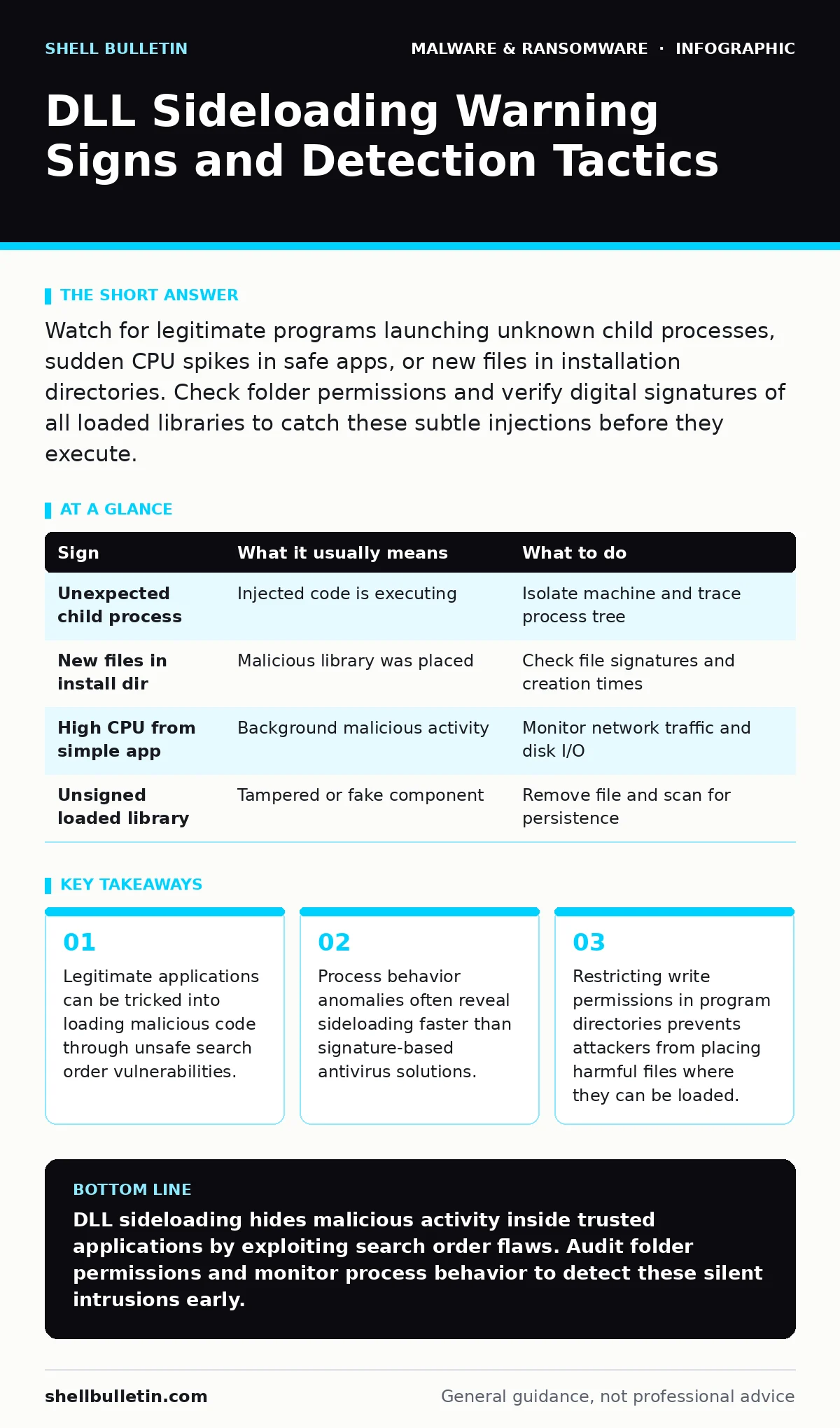
| Sign | What it usually means | What to do |
|---|---|---|
| Unexpected child process | Injected code is executing | Isolate machine and trace process tree |
| New files in install dir | Malicious library was placed | Check file signatures and creation times |
| High CPU from simple app | Background malicious activity | Monitor network traffic and disk I/O |
| Unsigned loaded library | Tampered or fake component | Remove file and scan for persistence |
Key takeaways
- Legitimate applications can be tricked into loading malicious code through unsafe search order vulnerabilities.
- Process behavior anomalies often reveal sideloading faster than signature-based antivirus solutions.
- Restricting write permissions in program directories prevents attackers from placing harmful files where they can be loaded.
DLL sideloading hides malicious activity inside trusted applications by exploiting search order flaws. Audit folder permissions and monitor process behavior to detect these silent intrusions early.
Frequently asked questions
How do I know if my software is vulnerable to DLL sideloading?
Check if the application searches for libraries in user-writable directories before its own installation folder.
Can antivirus software detect DLL sideloading automatically?
Signature-based antivirus often misses it, but behavioral monitoring and EDR solutions can catch the abnormal process activity.
What is the difference between DLL sideloading and injection?
Sideloading tricks the OS into loading a malicious file at startup, while injection forces code into a running process.
Do banking trojans use DLL sideloading?
Yes, they often use this technique to load keylogging modules inside trusted financial applications to steal credentials.
How this guide was produced: written by the Shell Bulletin editorial team with AI assistance, checked against the public references listed below, and reviewed when the facts change. See our editorial policy or report an error.