Password Leaks Myths: What Credential Theft Actually Means for Your Business
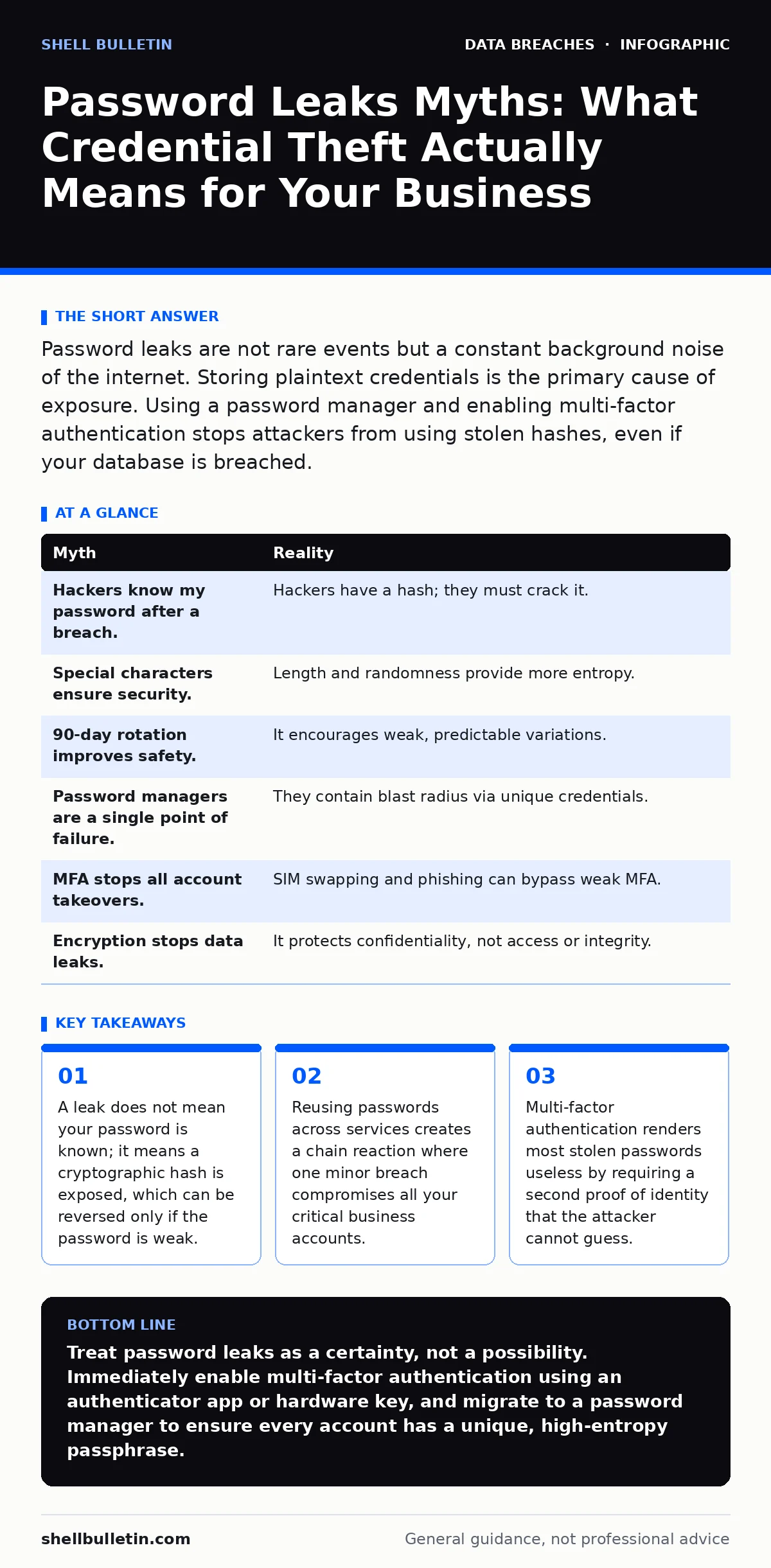
Your passwords are likely already compromised in public databases, making unique passphrases and multi-factor authentication the only reliable defense against automated account takeover.
Password leaks are not rare events but a constant background noise of the internet. Storing plaintext credentials is the primary cause of exposure. Using a password manager and enabling multi-factor authentication stops attackers from using stolen hashes, even if your database is breached.
Myth: A Data Breach Means Hackers Know Your Password
Reality: When a service suffers a breach, attackers usually steal a database of user records, not your actual password. Modern systems store passwords as hashes, which are one-way mathematical transformations of your text. If the service used strong hashing with a unique salt, the attacker sees only a long string of random characters, not "P@ssw0rd123".
The danger lies in what attackers do with those hashes. They run automated tools that test billions of common passwords against the stolen hashes. If your password was simple or appeared in previous leaks, the tool finds a match instantly. If your password was unique and complex, the hash remains secure because reversing a strong cryptographic function is computationally impossible with current technology.
This distinction matters because it changes how you assess risk. You are not worried about someone reading your secret; you are worried about someone guessing it using pre-computed tables of common passwords. Understanding this mechanism helps you realize that complexity and uniqueness are your primary shields against hash-cracking attempts.
Myth: Adding Special Characters Makes a Password Secure
Reality: Complexity rules that force special characters, numbers, and mixed case often lead to predictable patterns. Humans are terrible at generating randomness. Attackers' tools account for this behavior by testing common variations of dictionary words first.
Security depends on entropy, which is a measure of unpredictability. A random string of twelve letters has higher entropy than a short word with forced symbols. Length is a more effective barrier against brute-force attacks than arbitrary character requirements. Doubling the length of a password increases the time required to crack it exponentially, while adding a single symbol does not significantly raise the bar.
This misconception persists because many legacy systems enforce these rules. However, following them blindly can create a false sense of security. You might believe your password is "strong" because it passed the system's validation, when in reality, it sits in a list of commonly cracked patterns. Prioritizing length and randomness over forced complexity yields better protection.
Myth: Changing Passwords Every 90 Days Improves Security
Reality: Mandatory rotation encourages users to make minimal changes, such as incrementing a number or swapping one letter. This practice reduces the effective entropy of your password over time. Attackers know this habit and build algorithms that guess these predictable iterations. If "Password1" is leaked, they will immediately try "Password2" and "Password3".
Frequent changes also lead to password reuse or writing credentials down on sticky notes. When users are forced to create a new complex password every few months, they often reuse older variations to save mental effort. This increases the surface area for credential stuffing attacks, where stolen credentials from one site are tested on others.
The modern consensus favors changing passwords only when there is evidence of compromise. This approach allows users to create long, memorable passphrases that they can maintain without resorting to weak variations. It aligns better with the principle of least privilege and reduces the operational burden on security teams.
Myth: Password Managers Are Too Big a Target
Reality: Password managers are one of the most secure places to store credentials because they encrypt data on your device before it ever reaches the cloud. The encryption key is derived from your master password, which the vendor never sees. This means even if the password manager's servers are hacked, the attacker receives only useless ciphertext.
The risk of using a password manager is negligible compared to the risk of storing passwords in plain text or reusing them across sites. If you reuse passwords, one minor breach on an unrelated site can unlock your banking, email, and business accounts. A password manager generates unique, high-entropy passwords for every service, containing the blast radius of any single leak.
Critics argue that a single point of failure is dangerous. However, the master password is the only thing you need to remember, and it should be a long, memorable passphrase. Protecting this one secret is far easier than protecting dozens of weak, reused passwords. The convenience of auto-fill also reduces phishing risk, as the manager will not fill credentials on fake sites.
Myth: Multi-Factor Authentication Stops All Account Takeovers
Reality: Multi-factor authentication adds a second layer of defense, but it is not immune to all attacks. SIM swapping, where an attacker tricks your carrier into transferring your phone number, can intercept SMS codes. Phishing kits that proxy login requests can capture both your password and your second factor in real time, allowing the attacker to log in simultaneously with you.
The effectiveness of MFA depends heavily on the method used. SMS codes are vulnerable to interception and network vulnerabilities. Authenticator apps that generate time-based one-time passwords are more secure because they do not rely on the cellular network. Hardware security keys that use public-key cryptography provide the highest level of protection, as they are resistant to phishing and require physical possession.
You should view MFA as a significant reduction in risk, not an elimination of it. It stops automated bots and credential stuffing attacks, which account for the majority of breaches. However, targeted attacks against high-value accounts may still bypass weaker forms of MFA. Choosing the right method is critical to maintaining a strong security posture.
See also: Multi-Factor Authentication Setup for Small Teams
Myth: Encrypted Backups Prevent Data Loss from Leaks
Reality: Encryption protects data at rest, but it does not prevent the data from being exfiltrated if the backup is accessed by an attacker. If your backup credentials are weak or reused, the attacker can decrypt the backup just as easily as the primary database. Encryption is a control for confidentiality, not for access control or integrity.
Furthermore, backups are often stored with relaxed security controls to ensure availability. This makes them attractive targets for ransomware operators who know that disabling backups forces organizations to pay. Regularly testing backup integrity and storing copies offline or in immutable storage is necessary to mitigate this risk.
Relying solely on encryption for backup security is a common mistake. You need layered defenses, including strict access controls, network segmentation, and regular audits. Understanding the difference between data protection and data security helps you allocate resources more effectively.
| Myth | Reality |
|---|---|
| Hackers know my password after a breach. | Hackers have a hash; they must crack it. |
| Special characters ensure security. | Length and randomness provide more entropy. |
| 90-day rotation improves safety. | It encourages weak, predictable variations. |
| Password managers are a single point of failure. | They contain blast radius via unique credentials. |
| MFA stops all account takeovers. | SIM swapping and phishing can bypass weak MFA. |
| Encryption stops data leaks. | It protects confidentiality, not access or integrity. |
Key takeaways
- A leak does not mean your password is known; it means a cryptographic hash is exposed, which can be reversed only if the password is weak.
- Reusing passwords across services creates a chain reaction where one minor breach compromises all your critical business accounts.
- Multi-factor authentication renders most stolen passwords useless by requiring a second proof of identity that the attacker cannot guess.
Treat password leaks as a certainty, not a possibility. Immediately enable multi-factor authentication using an authenticator app or hardware key, and migrate to a password manager to ensure every account has a unique, high-entropy passphrase.
Frequently asked questions
How do I know if my password was leaked?
You cannot know for sure without checking a reputable breach aggregation service. However, if you have received a notification from a service or noticed unauthorized activity, assume your credentials are compromised and change them immediately.
Is it safe to use a password manager on public computers?
No. Public computers may have keyloggers or remote access tools installed. Use the device only for browsing and log out of all sessions. For sensitive tasks, use your own trusted device with a secure network connection.
What is the best type of multi-factor authentication?
Hardware security keys are the most secure because they cannot be phished and require physical possession. Time-based one-time password apps are a strong second choice. Avoid SMS-based codes if possible, as they are vulnerable to SIM swapping and interception.
Should I use biometrics like fingerprints for login?
Biometrics are convenient and resistant to remote attacks, but they cannot be changed if compromised. Use them as a second factor or for local device unlock, but do not rely on them as the sole method for accessing sensitive business accounts.
How this guide was produced: written by the Shell Bulletin editorial team with AI assistance, checked against the public references listed below, and reviewed when the facts change. See our editorial policy or report an error.